
News

The Complete Guide to Watching the BET Awards on YouTube TV
The Complete Guide to Watching the BET Awards on YouTube TV Table of Contents Cord-cutters can easily stream the event live for free on the
Claiming that the YouTube TV $20 credit starts with a steady internet—5 Mbps download speed minimum keeps the settings page loading smoothly without frustrating timeouts during the process. Subscribers often hit snags from spotty Wi-Fi or browser glitches blocking access to the claim button, but clearing cache and using a wired desktop connection sorts it out fast. Emails notify eligible users post-outage like recent Disney blackouts, directing straight to tv.youtube.com settings, where the Updates tab holds the prize.
This gesture reimburses disrupted viewing days, applying as bill reductions for sports fans missing games or families sans cartoons. No promo codes needed; active accounts qualify automatically during targeted periods. Cord-cutters turn lemons into savings, making the service even sweeter amid carriage spats.
YouTube TV issues $20 credits primarily as goodwill during service disruptions or retention promos, ensuring subscribers feel valued when channels go dark.
Major blackouts—like Disney-owned ABC, ESPN vanishing for days—prompt prorated refunds. A 10-day outage might net a full $20 based on daily rates from the $73 base plan. Emails arrive post-resolution: “Claim your credit for missed content.” Eligible dates auto-calculate; no proof required beyond active status. Past examples include Sinclair locals or Paramount spats, each sparking similar gestures.
Targeted offers hit long-term users—”$20 off next 3 bills” banners in Membership settings. New trials sometimes bundle equivalent value. Referrals reward invites, though less common now. All aim to retain amid rising competitors like Hulu Live.
Securing the $20 takes minutes via web—mobile apps redirect accordingly.
Log in to tv.youtube.com on Chrome or Edge—avoid the app. Profile icon top-right > Settings. Left sidebar: Updates. Scroll for outage notices with blue “Claim $20 Credit” buttons. Tap confirms; email receipt follows.
Membership > Manage shows personalized banners. Accept the locks discount cycle. Check Billing > Statements for pending credits post-claim.
Credits apply next cycle—$73 drops to $53. Track via app Statements tab. Stacking rare, but multiple outages accumulate.
Not every account qualifies—specific criteria apply.
Not every user is automatically entitled to a refund. To see a credit reflected in your account, you generally must meet a few specific criteria:
Instead of just letting the credit sit there, many subscribers use it to “test drive” the platform’s most powerful youtube tv add-ons.
If you’re staring at a screen where a button should be but isn’t, don’t panic. Try these “humanized” fixes:
YouTube TV will issue a $20 credit to subscribers via simple Updates claims during outages or Membership promos, turning disruptions into discounts. Stable internet unlocks the process; troubleshooting clears hurdles fast. Sports buffs, families, all save—stack with bundles for max value. Email alerts, web delivers; check Settings now before windows close. Reliability rebounds stronger with these gestures, solidifying cord-cutters’ choice.
Emails drop right into inboxes, guiding folks to tv.youtube.com, where Settings > Updates holds that blue Claim button under outage notices—just one quick tap and it shaves $20 straight off the next bill without any hassle.
Right after they fix the blackout mess like Disney channels going dark—expect emails within a couple of days of resolution, and the Updates tab keeps it visible even if the message slipped into spam somehow.
Any paid subscriber active during those disrupted days makes the cut—household account holders let the primary claim for everyone, with proration kicking in based on exact outage length so nobody gets shorted.
Click profile picture top-right on tv.youtube.com, dive into Settings, hit Updates on the left sidebar—bam, blue button pops under the specific outage listing ready for that easy click to lock in savings.
Claims happen web-only since the app skips the Updates tab—use phone browser to grab it, then refresh the app Statements next billing cycle and watch that $20 deduction show up clean and clear.
Typically, one runs at a time but back-to-back spats like Sinclair then Disney let them pile up—keep an eye on the Statements tab where every credit lists out plain so totals add nicely.
Give it 7-14 days max for the next cycle to process—jump on chat support if it’s lingering and they’ll nudge it through manually to your balance right then.
Absolutely, the Updates tab holds claims open 30-60 days no matter what—double-check the spam or promotions folder too, just to cover all bases before the window sneaks by.
Outage ones prorate real disruptions day-by-day while promo banners in Membership target loyalty with a flat $20 off for several months—both sweet but check the right spot for each.
Yeah, an active subscription’s a must right at claim time—better to pause billing temporarily if needed so that eligibility stays intact and you don’t miss out on the free money.

The Complete Guide to Watching the BET Awards on YouTube TV Table of Contents Cord-cutters can easily stream the event live for free on the
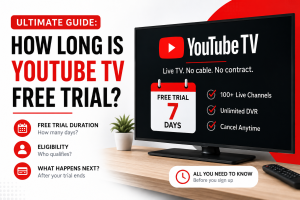
Ultimate Guide: How Long is YouTube TV Free Trial? Table of Contents Usually, the free trial from YouTube TV lasts 5 to 7 days, allowing
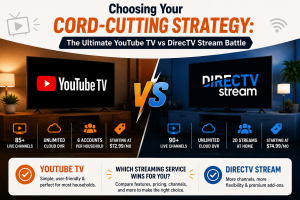
Choosing Your Cord-Cutting Strategy: The Ultimate YouTube TV vs DirecTV Stream Battle Table of Contents When evaluating your modern entertainment options, comparing youtube tv vs